 VectoDesk
Open real SVG files
Drop an .svg onto the canvas or use File › Open. Paths, shapes, fills and strokes arrive as editable objects rather than a flattened image.
Open, edit and export vector graphics with a powerful online workspace. No installation required.
Runs on WebAssembly · WebGPU with automatic WebGL2 fallback · No account
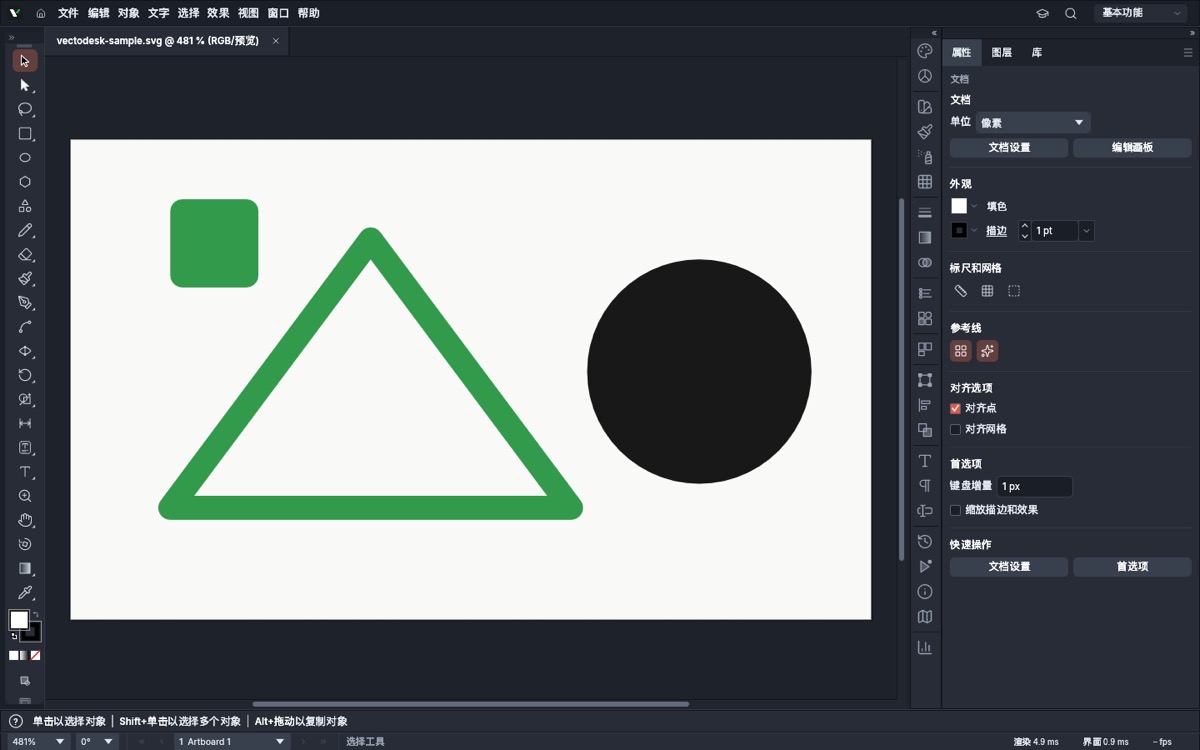
The same editing engine that runs on the desktop, compiled to WebAssembly. Menus, shortcuts and canvas interaction are untouched.
Drop an .svg onto the canvas or use File › Open. Paths, shapes, fills and strokes arrive as editable objects rather than a flattened image.
Pen and Direct Selection tools expose anchor points and curve handles, so you can reshape a path instead of only scaling its bounding box.
A real layer tree, numeric transform fields, fill and stroke controls, alignment, grids and snapping — visible in the screenshot above.
Export PNG with explicit resolution, background and anti-aliasing settings, or use the app's SVG, PDF, JPEG and WebP export paths.
Editing happens inside the browser tab. There is no account, no upload and no server-side document store — export your file before you close it.
The original toolbar, menu commands and keyboard shortcuts are kept intact. Nothing in the branding layer intercepts canvas input.
Short, concrete jobs where installing a full design suite would be the slow part.
Recolour an icon set, adjust a viewBox or check a logo at a new size, then export a PNG preview for a pull request without leaving the browser.
Sketch interface shapes and layout blocks that stay crisp at any zoom, with layers you can still rearrange on the next visit.
Posters, social graphics and simple illustrations on a machine where installing and maintaining a desktop editor isn't an option.
Tweak a repository diagram or a technical illustration, then re-export it in the format your docs pipeline expects.
Go to /app/. The first visit downloads the vector engine (about 97 MB, split into five cached parts); later visits reuse the browser cache.
Drag an SVG file onto the canvas — this is the path we verified end to end — or start a new document from one of the presets.
Select a shape, reshape anchors and handles, and set position, size, fill and stroke in the Properties panel. Everything remains vector.
File › Export › Export as PNG…, pick resolution and background, then Export. Follow the PNG export guide for the exact dialog.
No. The editor is a static WebAssembly application served from /app/. There is no sign-up, no backend and no cloud document store; export a file to keep your work.
The engine is built with WebAssembly SIMD, so it needs Chrome or Edge 91+, Firefox 89+, or Safari 16.4+. A desktop browser with a keyboard and pointer is recommended. WebGPU is used when available and falls back to WebGL2 automatically.
We verified SVG import and PNG export in this build. The editor also exposes SVG, PDF, JPEG and WebP export paths plus its native document format. See the format overview for the details and limits.
The compiled engine is about 97 MB. It is split into five parts under the Cloudflare Pages 25 MiB per-file limit and cached as immutable, versioned assets. Only /app/ requests it — the home page and all guides are plain HTML and CSS.
The app prefers WebGPU and automatically falls back to WebGL2. You can force WebGL2 with ?webgl on the editor URL, or the slower CPU canvas path with ?cpu.
The editor is built on the open-source VectorCraft engine (MIT OR Apache-2.0). We keep the upstream licences, notices and third-party attributions intact — see open-source notices.